Maybe you have heard me blogging, speaking or tweeting off and on about using runspaces (or runspacepools) as a means to run tasks in the background vs. using PowerShell Jobs (PSJobs) (Start-Job, Get-Job, etc…).
While I have seen a lot of folks make some great scripts/functions that utilize this technique to run multiple concurrent operations in the background using throttling as well as being speedier than using PSJobs, the one thing that I thought was missing was a similar PSJobs like architecture that would send these runspaces to their own runspacepool that would then be tracked and disposed of when no longer needed. We would also have an easier way to view the state of each runspace job just like we would using PSJobs with Get-Job.
Enter PoshRSJob.
This is something that I have worked on for the past several months off and on to bring in a PSJobs like approach that instead uses runspacepools and runspaces to do what you could normally, but now with throttling, better performance and just because it was something fun to work on. This is still very much a Beta project and doesn’t cover everything that you find in PSjobs, but I am confident that it will work with most of what you want to do with it.
So how do I get this brand new module? You can download this currently from GitHub here. Eventually when I present a version 1.0 release, it will find its way to the PowerShell Gallery and perhaps CodePlex.
Once it is downloaded and placed in your Modules folder of choice.

In my case, I am placing this under my Documents folder so it will be available with my profile.
Once I have done that, I can verify that the module is showing up.

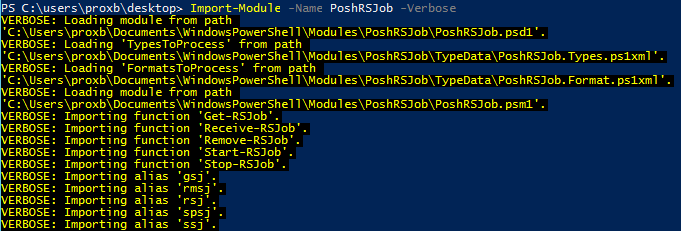
Now I will go ahead and import the module so it is available in my session using the following command;
Import-Module –Name PoshRSJob
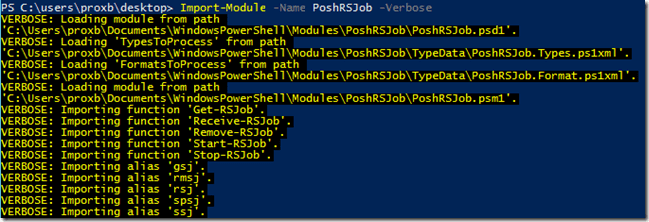
And now we are ready to start using this!
I intentionally made the functions as similar as I could to what you would find with *-Job as well as similar parameters so there would be that familiarity that we are already used to.

Currently these are the only functions that I have available and some of the parameters may be limited, but I do have plans to expand out with a Wait-RSJob and some extra parameters for certain functions. With that out of the way, let’s get started with looking at how these work.
Start-RSJob
Arguable the most important function here. This is the function that will kick off various runspace jobs that we can then send to the background so we have the console free to do whatever we want. This is really the only function that I will go into depth with because the other functions behave very much like their PSJobs counterparts and share the same parameters.
Let’s look at the parameters of this function.

- InputObject
- This is where you would pipe data into the function (or provide a collection of items) that will then take that object and use it as the first Parameter in your scriptblock as long as you add a Param() block in it.
- Name
- This is the name of your job. You can also take the input being piped to this function and use a scriptblock to create a more useful name. –Name {“Test_$($_)”} for instance.
- ArgumentList
- This is similar to using Start-Job and supplying extra variables that will be referenced based on what you have in your Param() block in the scriptblock (and in the same order).
- Throttle
- This is one of the cool things about this module. We can now throttle how many concurrently running jobs are going at a given time. The default value is 5, but you can make this whatever you want. No more worries about finding a way to do throttling on your own!
- ModulesToImport
- This lets us specify various modules that we want to import in each runspace job to run various commands.
- FunctionsToLoad
- Similar to the modules parameter, but this is something new with PoshRSJob that you won’t find in the PSJobs cmdlets.
Those are the parameters, but we aren’t done yet with some cool features. As you know, $Using: was introduced in V3 that allows us to bring in variables from our parent PowerShell process into the PSJob’s scriptblock like magic! Well, after some digging around and some tears, I have brought this excellent feature to PoshRSJob to use as well! But it doesn’t stop there because I back ported this capability to work in PowerShell V2 as well!
Now let’s see some of this in action. Notice that I do not use ForEach when using Start-RSJob. This takes input directly from the pipeline to work properly and fully utilize the throttling capabilities.
$Test = 42
1..5|Start-RSJob -Name {"TEST_$($_)"} -ScriptBlock {
    Param($Object)
    $DebugPreference = 'Continue'
    $PSBoundParameters.GetEnumerator() | ForEach {
        Write-Debug $_
    }
    Write-Verbose "Creating object" -Verbose
    New-Object PSObject -Property @{
        Object=$Object
        Test=$Using:Test
    }
}

This is a familiar view. We see our job id, name as well as the state of the job and if we have errors/data available. You can see how we set up our –Name to be whatever the input object is that is being passed via the pipeline.
We can use Get-RSJob and filter for various states to see how our jobs are doing. In the case of above, everything has already finished up. What is also worth noting is that this took pretty much no time at all to set up and run. We can compare that with something similar to PSJobs and see the performance.
Write-Verbose "RSJobs Test" -Verbose
$Test = 42
(Measure-Command {
    1..5|Start-RSJob -Name {"TEST_$($_)"} -ScriptBlock {
        Param($Object)
        $DebugPreference = 'Continue'
        $PSBoundParameters.GetEnumerator() | ForEach {
            Write-Debug $_
        }
        Write-Verbose "Creating object" -Verbose
        New-Object PSObject -Property @{
            Object=$Object
            Test=$Using:Test
        }
    }
}).TotalSeconds

Write-Verbose "PSJobs Test" -Verbose
$Test = 42
(Measure-Command {
    1..5 | ForEach {
        Start-Job -Name "TEST_$($_)" -ScriptBlock {
            Param($Object)
            $DebugPreference = 'Continue'
            $PSBoundParameters.GetEnumerator() | ForEach {
                Write-Debug $_
            }
            Write-Verbose "Creating object" -Verbose
            New-Object PSObject -Property @{
                Object=$Object
                Test=$Using:Test
            }
        } -ArgumentList $_
    }
}).TotalSeconds
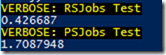
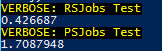
The test here is about a second faster with just 5 jobs. Given this was a simple job example, but depending on what you are using and how many jobs you plan to run, there will be an advantage with using PoshRSJob.
So I mentioned that $Using works great on PowerShell V2, so let me back up that claim with this:
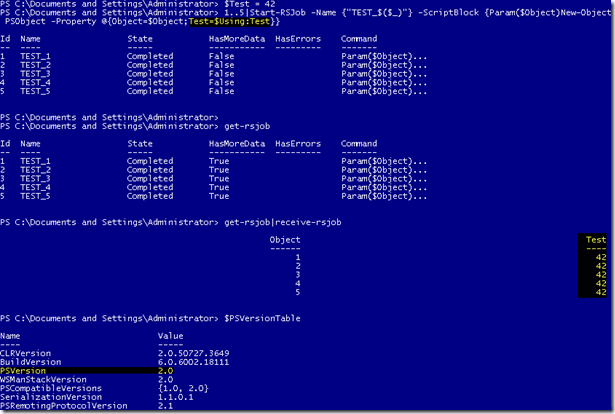
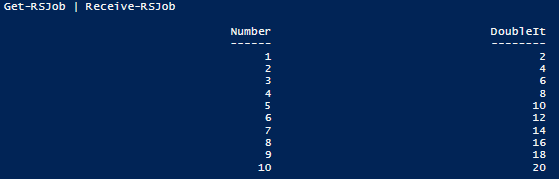
You can see that I am using V2 and have complete use of $Using to keep my variables in my parent scope into the RSJob.
You can also see my use of Receive-RSJob to grab the data that is available from the job.
If you want streams support that you find in PSJobs, they are here as well in the RSJob. Checking out the RSJob object, we can see the Verbose and Debug stream.

If we had any errors, we would see that the HasErrors property would be True and we could check out the Error stream as well to see what happened.
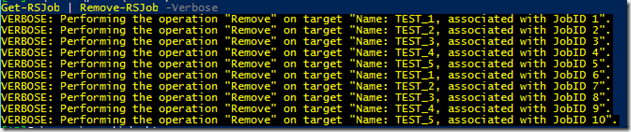
Stopping a RSJob and Removing a RSJob behaves just like you would find with the PSJobs cmdlets. You can pipe the objects from Get-RSJob into each function or specify filtering based on various parameters.
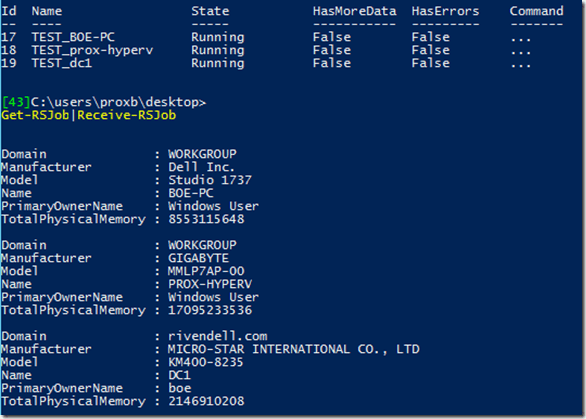
One last example this time letting me run a query against multiple systems.
$Cred = Get-Credential
@($Env:Computername,'prox-hyperv','dc1')|Start-RSJob -Name {"TEST_$($_)"} -ScriptBlock {
    Param($Computername)
    $DebugPreference = 'Continue'
    $PSBoundParameters.GetEnumerator() | ForEach {
        Write-Debug $_
    }
    Write-Verbose "Connecting to $Computername" -Verbose
    If ($Computername -eq $Env:Computername) {
        Get-WMIObject -class Win32_Computersystem
    } Else {
        Get-WMIObject -class Win32_ComputerSystem -ComputerName $Computername -Credential $Using:Cred
    }
}
Now we will grab the data that is waiting inside each RSjob object.
So with that, feel free to give it a download and let me know what works, what doesn’t work and what you think should be in it. Remember, this is still a beta and has more work to do, but in my own limited testing, things seemed to work pretty well with minimal issues (that I have hopefully fixed up to this current release). I also hope to add a Wait-RSJob and a few more parameters to keep these as close as I can to their PSJob equivalents for ease of use.
Download PoshRSJob
https://github.com/proxb/PoshRSJob





















 Learn Powershell | Achieve More