2012 Scripting Games Have Started!

image

That is right! The 2012 Scripting Games have officially kicked off! Head over here to get the first event (Beginner | Advanced) and then head to poshcode to sign in and submit your scripts for either the Beginner or Advanced event. Remember, you can only pick one category and submit one script per event. So make it count and take your time before submitting (you have a whole week from the event start time to get your script in) and good luck!

Posted in News, Scripting Games 2012 | Tagged , | Leave a comment

Re-Awarded Microsoft Community Contributor For 2012

MCC12_Social Media_Logo

I checked my email and found that I had been re-awarded the Microsoft Community Contributor (MCC) for 2012. I say re-awarded because even though I had it for 2011 and got it again for 2012, there is not an actual re-awarding process for existing members. It merely drops off at the end of the year for about a month and you get re-evaluated again for the award based on what you provide in the community forums such as PowerShell and Hey, Scripting Guy!.

Never the less, I am very humbled and happy to get this again. Thanks to everyone that put me in for this and all of those that I have helped out in the forums by answering their questions and providing feedback on issues. I look forward to this year in not only helping out others with their PowerShell questions but also on providing new and interesting PowerShell projects such as my recent project: PoshChat as well as being a judge this year and an expert commentator in the 2012 Scripting Games and future guest articles on Hey, Scripting Guy!.

Thanks again everyone!

Posted in News | Tagged , , | 4 Comments

PoshChat updated to 0.9.2

I finished a little update to PoshChat that I wanted to push out prior to the start of the Scripting Games on Monday. I made a few updates to the client UI to include text colors for specific messages and updating the font size if required.

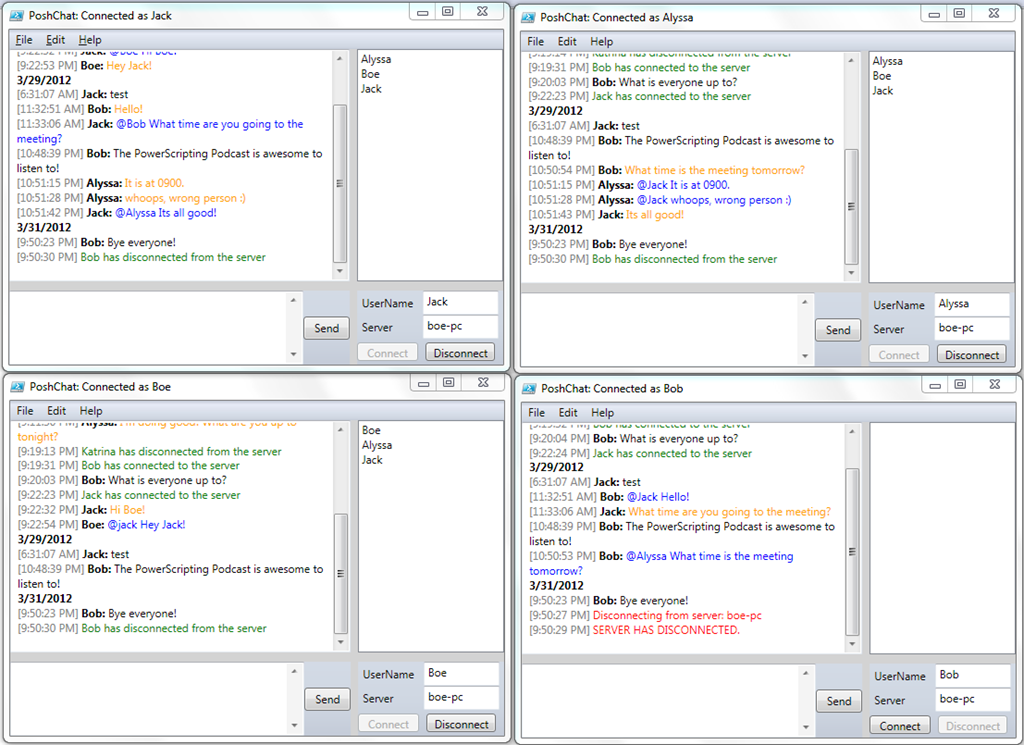
Also included is the ability to send a direct message to a user by starting with the ‘@’ sign and then the username right after that followed by the message. This will only send the message to that user and no one else.

image

The message that you send to that individual will show up in Blue while the message they receive will show up as Orange.

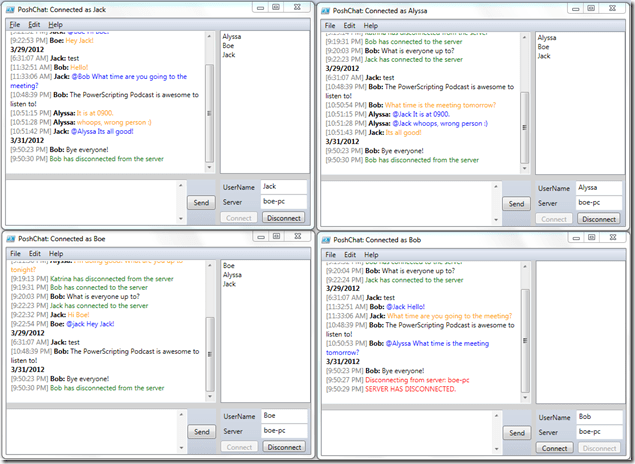
Here is another image that shows it more in action with other clients.
PoshChat

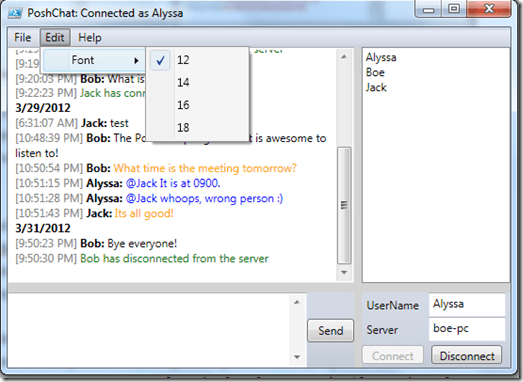
Based on the type of message, it will be a specific color. Regular messages will be black, direct message received are orange, direct messages sent will be blue, users connecting and disconnecting will be green and error messages and local server disconnects will be red.

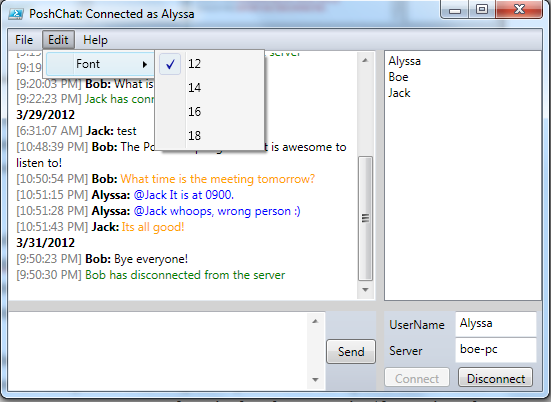
You can also change the font size in the Edit menu.
image

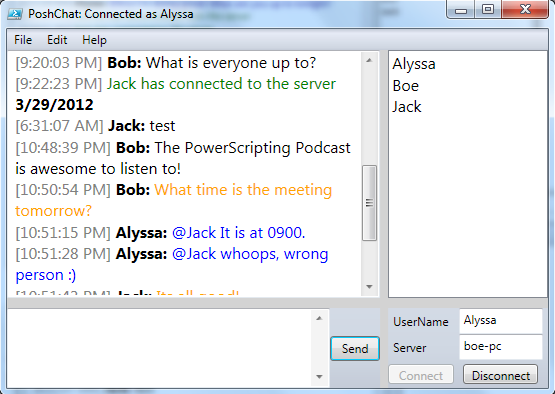
Lets change this to 16 Font.

image

At this size, you would definitely need to make the window a little larger.

Options for Font at this point in time are: 12,14,16 and 18

Another thing I updated was the timestamp that would appear with each message vs. having both a datetime stamp used. I figured this would add a little more space to the messaging. The date stamp will only show up at the beginning of the chat session and then only if the day changes during the current session.

I hope you enjoy the current update and I have many more coming up in the future once the Scripting Games are completed. I have updates planned for an Options menu where the font selection.username,server, port and session key for encryption/decryption. Also a more graceful way of shutting down the chat server is being worked as well (currently the only way is to shut down the server is by closing the PowerShell console window.

Posted in powershell | Tagged , | 3 Comments

Guest Blog On Hey, Scripting Guy! On Prepping For The Scripting Games

My latest article for Hey, Scripting Guy! is live and talks about what you can do to prepare for the Scripting Games, which start on April 2, 2012. Let me know what you think about it!

Tips for Preparing for the 2012 PowerShell Scripting Games

And, good luck to the scripters this year! It is going to be a fun time!

Posted in powershell, Scripting Games 2012 | Tagged , , | Leave a comment

Scripting Games 2012 Tip: Proper Function Names

Many of you will compete in the Scripting Games this year, and most of you will look to write an Advanced Function or two or more. When doing this, one thing to keep in mind is the naming of the function.

The proper naming of a PowerShell function is to use a Verb-Singular Noun naming convention. To add to that, there is a list of ‘approved verbs’ that you should look at using to stay consistent with naming standards.

To see the list of approved verbs, run the following command:

Get-Verb | Format-Wide -Column 3

image

If you want to know more about what each Verb is used for, just use Get-Verb and it will give you the Group that it belongs to.

As long as you use an approved verb and a singular noun like this…

Get-Server
Set-LogFile
Select-LogFile
Add-Right

…you should be ok. But if you choose to use something that doesn’t fit this criteria, expect people to comment about it and advise you to change it something that is approved.

Obviously, your nouns that you use will vary based on the objective. Make sure that the function name you choose makes sense and fits the idea of what the function itself is trying to accomplish.

Posted in Scripting Games 2012 | Tagged , , | Leave a comment